
De-risking HIPAA Compliance with Automation
Regular reporting is critical for HIPAA compliance. It helps you:
- Demonstrate compliance with audit trails and access logs
- Be audit-ready with reports already in hand.
- Detect risks early by monitoring inappropriate actions or unauthorized access
NEW Enhancement: Favorite & Automate Reports
You can now save the HIPAA Log Report as a favorite. Once saved, you can:
- Run the report
- Schedule it to run later
- Edit the name and description field
- Delete reports you no longer need
This means your HIPAA reports run automatically and can be scheduled daily, weekly, or monthly.
How to Schedule a Report
- Simply save the report as a favorite report
- Think of favoriting a report as saving the report template
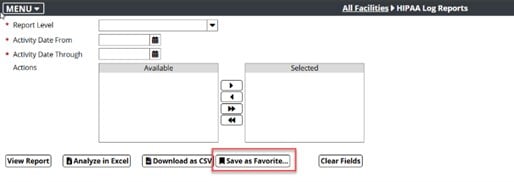
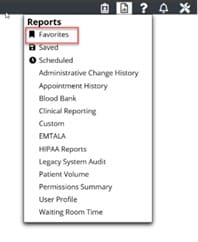
Once a report is saved to favorites, it can be found under the Reports menu.
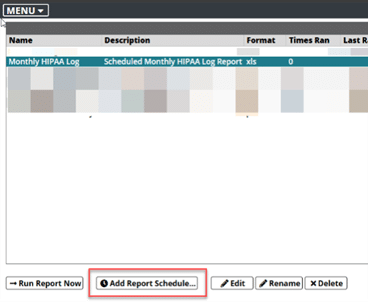
Within the Favorites menu, a user can schedule the report daily, weekly, or monthly by clicking Add Report Schedule.
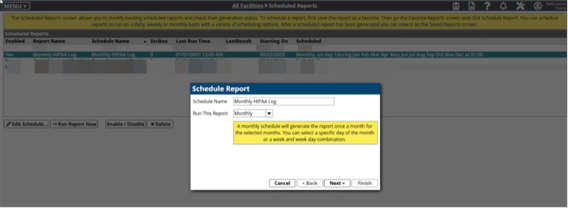
To find the details of the scheduled report, click on Scheduled in the Reports menu. The scheduled reports screen allows users to modify existing scheduled reports and check their generation status.
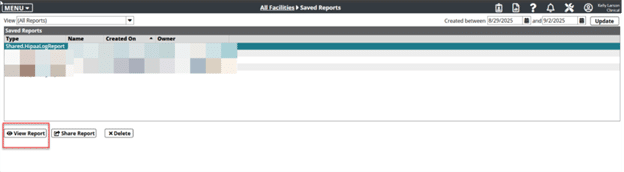
Once the scheduled report has been generated, you will see it appear on the Saved Reports screen (click on the Reports menu to see the Saved Reports). This is where you’ll see all the versions of your scheduled report.
To recap:
- Want to schedule a report? Favorite it first!
- Scheduled Reports: Review or edit all the reports that are set to run on a recurring basis.
- Saved Reports: Access each version of your scheduled reports.
Questions? Want a demo? Let’s connect.
More Thought-Leadership

Legacy Health Application Data: A Proven Method for Elevating the Patient Experience
By integrating legacy data into innovative systems and strategies, hospitals can not only improve patient outcomes, but also create more efficient, responsive and satisfying healthcare experiences. During a recent Becker's Healthcare digital event, “How Health Systems...

3 Ways Healthcare Active Archive Benefits Hospitals and Health Systems
AuthorDr. Kel Pults, DHA, MSN, RN, NI-BC, NREMT, Chief Clinical Officer & VP Government Strategy, MediQuant, Co-chairperson of the Active Archive AllianceNot all health data archiving solutions are created equal. Static health data archiving backups remain frozen...

Recognizing When Legacy Applications Are Holding You Back
Written By: Jason Stewart, Conversion Services ManagerReplacing an EHR application is more than just another upgrade—it's a critical shift that can reshape your organization. However, this process carries significant risks. Studies show that up to 70% of large...
Contact Us Today
